We covered entities in Chapter 5. Here’s Chapter 6, which covers attributes. Next up is Relationships (the data kind). I’ll be revising some of the older chapters (thanks to those who pointed out some errors) and editing the upcoming chapters. I’m guessing Chs 7-9 will be released next week.
The challenge with Chapters 5 to 7 are they were written quite a while ago, often two years ago. Revising these chapters, which are very core to data modeling, is actually quite difficult. In some cases, not much has changed. In others, like ML/AI, a lot has changed. We now have agents and “knowledge”, which weren’t in the earlier versions. Plus, I’m sometimes a bit of a klutz. I’ll likely be putting these through the wringer a couple more cycles to make sure they’re in good shape for publication. Onward we go.
Thanks and have a great weekend,
Joe
Striking day. The coach pairs you up to hold pads for each other. While you’re working, she walks over and watches your partner throw a combination. “Your cross has power but no speed. And you’re dropping your right hand every time you jab. Fix that before it becomes a habit.” She adjusts his elbow, shows him the angle, and moves on to the next pair.
Every fighter has the same basic tools, but the details that separate them include height, reach, speed, power, and accuracy. You feel these when your partner’s cross snaps through the pads harder than you expected, or when someone’s reach means you can’t get close without eating a jab. One of the more experienced guys tells you after class, “Don’t just learn the technique. Learn your version of it. My jab works because I’m tall. Yours will work for a different reason.”
In data modeling, attributes are the unique properties that define an entity. Two customers aren’t the same customer just because they’re both customers—their names, addresses, order histories, and credit terms make each one distinct.
A data modeler names a column “Date” in the customer table. Seems innocent enough, right? Wrong. First, it’s a reserved keyword or core data type in almost every database. Even if your specific database engine lets you get away with it without throwing a syntax error, it turns your queries into a confusing mess. Syntax highlighters will color it as a function, data-warehouse migration tools might choke on it, and downstream analysts will often have to wrap it in annoying quotes or brackets just to be safe. Second, what does it actually mean? Is it when the customer signed up? When did they make their first purchase?
Get the attributes wrong, and you’re in for a bad day. But we’re not here to do things wrong and lose. Let’s look at attributes across the structured, semi-structured, and unstructured data.
Attributes in Structured Data
In structured data, an entity becomes a table. The table’s attributes are its columns. Each row is an instance of that entity.
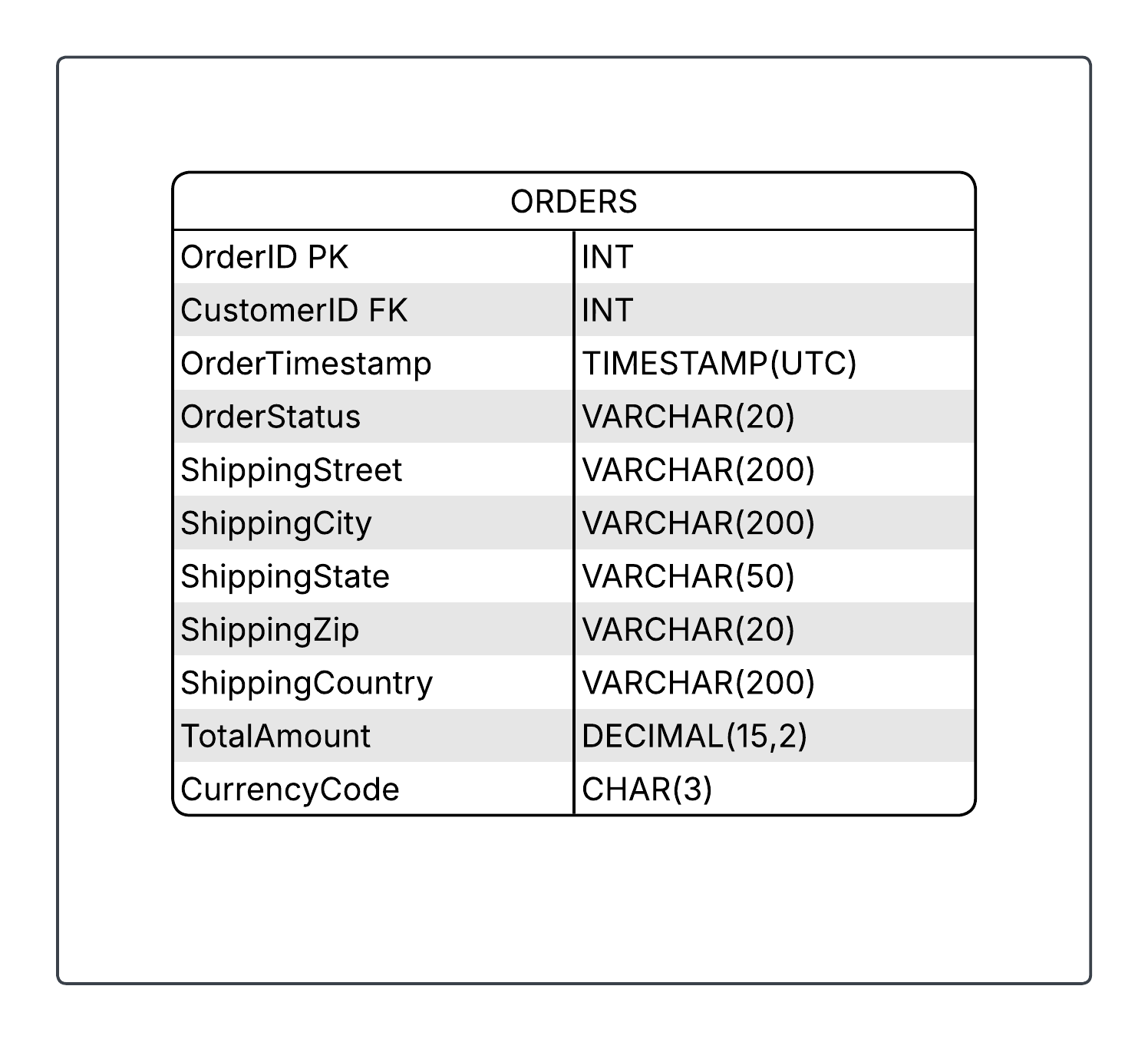
Consider the Orders table from our previous discussion. At a high level, this table describes a customer’s order, including their order and shipping information. The attributes in this table are OrderID, CustomerID, OrderTimestamp, and so on. Here’s what that looks like with sample values:
Figure 6-1: An abbreviated example of the Orders Table
Notice several things here. In structured data, each column has a unique top-level name describing what it contains. The data stored varies in length, format, and style. In some cases, data types (Integer, Decimal, Varchar, etc.) are strictly enforced by the database management system (DBMS). In other situations—such as spreadsheets—there’s no strict enforcement. A column might contain multiple data types, mixing strings and numbers. Also note that some fields, such as TotalAmount, are required, so a record cannot be created without them.
Now that we have the attributes (or column names), we need to populate them with values. Where do these attribute values come from? Sometimes attributes are generated automatically; other times they’re manually entered. For example, when an order is created, an OrderID is automatically created, whereas TotalAmount is automatically calculated once a customer places an order, as it’s the sum of all products or services ordered, including taxes and shipping. Notice that the individual products or services aren’t listed here; they belong in a separate table, perhaps called OrderLineItem, that contains details for each OrderID.
OrderStatus works differently. It has five preset options: “Pending”, “Processing”, “Shipped”, “Delivered”, and “Cancelled”. These values are determined upstream by data input rules. A shipping clerk might manually enter data via a form with a dropdown menu restricting them to valid options. Ideally, a validation rule checks the input against this allowed list. A better approach would be automating status changes using barcode or RFID scanners. Either way, these five order status options remain fixed, subject to business rules.
Finally, notice that we’re not just naming attributes—we’re also documenting technical metadata like data type, description, whether it’s required, and the key type (primary or foreign). If metadata is “data about data,” then this is “attributes of an attribute.” This technical metadata is standard in databases for enforcing schema, but less common in dataframes and spreadsheets.
Notice something else here—this structured model, with its columns and types and constraints, is native to the Relational Camp, and to a lesser extent, the Analytical Camp. Structured data is often where attributes live most naturally. But attributes don’t stop at columns. A Mixed Model Artist understands that the same conceptual entity—say, an Order—has attributes native to each camp.
In Relational, it’s those columns: OrderID, CustomerID, OrderDate. In the Analytics camp, the concept of an ‘attribute’ gets strictly redefined. Descriptive properties—like a customer’s tier or a product’s category—become dimension attributes used to slice and filter your dashboards. The quantitative properties—like tax paid or quantity ordered—are reclassified as measures. These measures live inside a fact table (which represents the business event itself) and are designed to be aggregated. We’ll learn more about the star schema throughout this book series.
Moving on to the other camps. In Applications, you might use a NoSQL database where attributes become nested fields and keys in a document structure, giving you flexibility and denormalization. In the ML/AI camp, attributes become features—numerical or categorical inputs to models predicting order behavior. Finally, in the Knowledge camp, attributes become semantic properties in an ontology: an Order is-a Transaction, has-a Customer, occurs-at a Point-in-Time.
Attributes in Semi-Structured Data
Semi-structured data is less formal than structured data, but entities and attributes often translate nicely. Let’s convert the Orders table to JSON and include sample values. JSON offers flexibility—you could combine Order and Customer datasets or keep them separate. We’ll keep them separate for clarity.
In this semi-structured JSON document for our Orders entity, the core attributes (orderId, customerId) map exactly to the corresponding columns in the relational table. But notice the tags attribute. Instead of a single value, it holds an array of strings. Semi-structured formats allow a single attribute to contain multiple primitive values natively, without creating a whole new table just to track whether an order is a gift.
Order entity:
{

  “orderId”: 12345,

  “customerId”: 1,

  “orderTimestamp”: “2026-03-07T14:30:00Z”,

  “orderStatus”: “Processing”,

  “shippingAddress”: {

    “street”: “123 Data Way”,

    “city”: “Salt Lake City”,

    “state”: “UT”,

    “zip”: “84101”

  },

  “tags”: [

    “expedited”,

    “giftWrapped”,

    “firstTimeBuyer”

  ]

}
Customer entity: