Accessing Kubernetes API from a Pod (RBAC)
Follow into
Save into
Follow into
This article describes in general how to set up permission for a Pod so that it will have access to Kubernetes API.
My exact use case was that, I wanted to run a Pod which will watch a redis queue and then start a job whenever there is a new item in the queue. I will only be explaining how to set up the permissions and I think the rest of the tasks has been well explained by a lot of people.
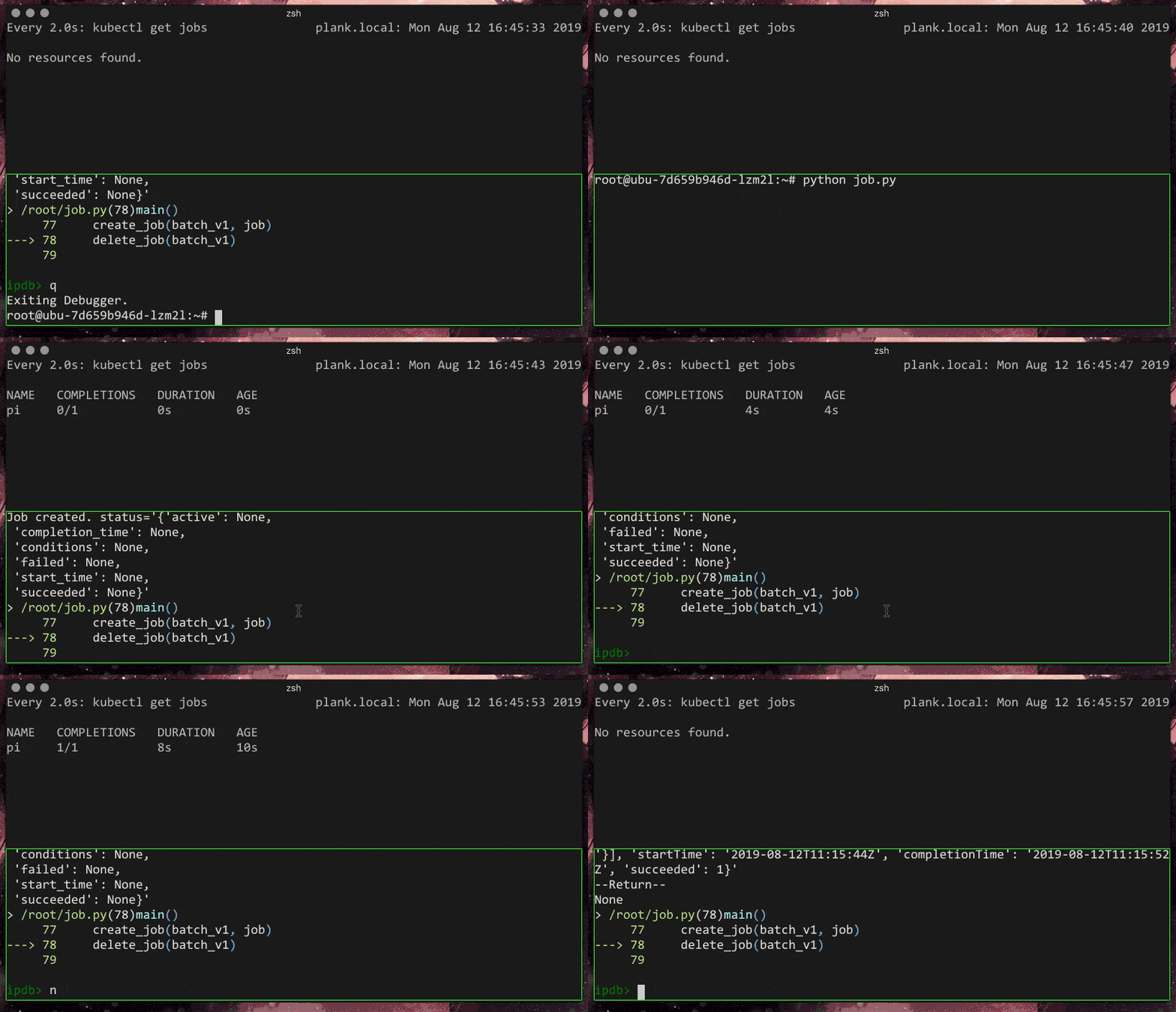
So, I have a simple python file that I would like to run to create a Job and then delete it later. It will look something like this:
 1from kubernetes import client, config
 2
 3JOB_NAME = "pi"
 4
 5
 6def create_job_object():
 7    # Configureate Pod template container
 8    container = client.V1Container(
 9        name="pi",
10        image="perl",
11        command=["perl", "-Mbignum=bpi", "-wle", "print bpi(2000)"])
12    # Create and configurate a spec section
13    template = client.V1PodTemplateSpec(
14        metadata=client.V1ObjectMeta(labels={"app": "pi"}),
15        spec=client.V1PodSpec(restart_policy="Never", containers=[container]))
16    # Create the specification of deployment
17    spec = client.V1JobSpec(
18        template=template,
19        backoff_limit=4)
20    # Instantiate the job object
21    job = client.V1Job(
22        api_version="batch/v1",
23        kind="Job",
24        metadata=client.V1ObjectMeta(name=JOB_NAME),
25        spec=spec)
26
27    return job
28
29
30def create_job(api_instance, job):
31    # Create job
32    api_response = api_instance.create_namespaced_job(
33        body=job,
34        namespace="default")
35    print("Job created. status='%s'" % str(api_response.status))
36
37
38def update_job(api_instance, job):
39    # Update container image
40    job.spec.template.spec.containers[0].image = "perl"
41    # Update the job
42    api_response = api_instance.patch_namespaced_job(
43        name=JOB_NAME,
44        namespace="default",
45        body=job)
46    print("Job updated. status='%s'" % str(api_response.status))
47
48
49def delete_job(api_instance):
50    # Delete job
51    api_response = api_instance.delete_namespaced_job(
52        name=JOB_NAME,
53        namespace="default",
54        body=client.V1DeleteOptions(
55            propagation_policy='Foreground',
56            grace_period_seconds=5))
57    print("Job deleted. status='%s'" % str(api_response.status))
58
59
60def main():
61    # Configs can be set in Configuration class directly or using helper
62    # utility. If no argument provided, the config will be loaded from
63    # default location.
64
65    # config.load_kube_config()
66    config.load_incluster_config()
67    batch_v1 = client.BatchV1Api()
68
69    # Create a job object with client-python API. The job we
70    job = create_job_object()
71
72    create_job(batch_v1, job)
73    jobs = batch_v1.list_namespaced_job('default')
74    jobs.items[0].status
75
76    update_job(batch_v1, job)
77
78    delete_job(batch_v1)
79
80
81if __name__ == '__main__':
82    main()
Here is the gist of the architecture. We have a Pod running in the default namespace. We will be creating and later deleting a Job from within this namespace.
So, what we will have to do is to allow the Pod access to the Kubernetes API so that it can do the various tasks. If you were to run without giving the needed permissions you will end up getting a error message like:
kubernetes.client.rest.ApiException: (403)
Reason: Forbidden
HTTP response headers: HTTPHeaderDict({'Audit-Id': 'e518f584-364d-40b7-a6d1-d4528062298d', 'Content-Type': 'application/json', 'X-Content-Type-Options': 'nosniff', 'Date': 'Mon, 12 Aug 2019 08:11:29 GMT', 'Content-Length': '313'})
HTTP response body: {"kind":"Status","apiVersion":"v1","metadata":{},"status":"Failure","message":"jobs.batch is forbidden: User \"system:serviceaccount:default:job-robot\" cannot create resource \"jobs\" in API group \"batch\" in the namespace \"default\"","reason":"Forbidden","details":{"group":"batch","kind":"jobs"},"code":403}
Architecture #
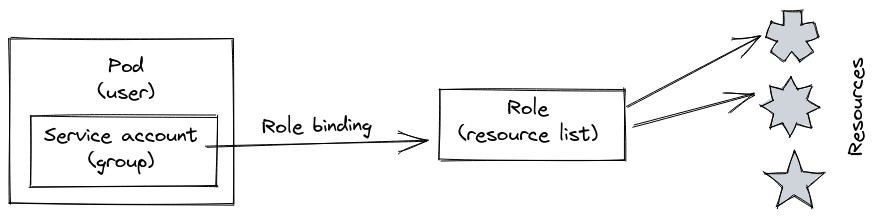
- Create a new
ServiceAccountobject. We will later create aPodwhich we assign to thisServiceAccount - Create a new
Role. ARoleis instructions on what aServiceAccountwill have access to. It will not say whichServiceAccountwill have access. - We can say that specific
ServiceAccountwill have theRolerules by using aRoleBinding. - Now you create a
Podwhich will be assigned to the createdServiceAccount.
The difference between
Role{,Binding}andClusterRole{,Binding}is that in the latter, you apply it for all namespaces.
Code #
Below is some sample yaml file that you could use for reference.
ServiceAccount #
This can be technically considered like a group(don't confuse with the Group concept), and things belonging to this group can be assigned specific rules. Here we create a ServiceAccount with the name job-robot.
1apiVersion: v1
2kind: ServiceAccount
3metadata:
4  name: job-robot
Role #
Here we create a Role with the name job-robot (does not have to the same as the service-account). We let the Role to have access to get,list and watch pods. Also to get,list,watch,create,update,patch and delete jobs
We will later assign this to the ServiceAccount.
 1apiVersion: rbac.authorization.k8s.io/v1
 2kind: Role
 3metadata:
 4  namespace: default
 5  name: job-robot
 6rules:
 7- apiGroups: [""] # "" indicates the core API group
 8  resources: ["pods"]
 9  verbs: ["get", "list", "watch"]
10- apiGroups: ["batch", "extensions"]
11  resources: ["jobs"]
12  verbs: ["get", "list", "watch", "create", "update", "patch", "delete"]
RoleBinding #
Now we have to bind the Role to that ServiceAccount. Here we create a RoleBinding with the name job-robot (again, does not have to be the same). Doing this will bind your Role to the ServiceAccount.
You define you Role in the roleRef section and your ServiceAccount in the subjects section.
 1apiVersion: rbac.authorization.k8s.io/v1
 2kind: RoleBinding
 3metadata:
 4  name: job-robot
 5  namespace: default
 6subjects:
 7- kind: ServiceAccount
 8  name: job-robot # Name of the ServiceAccount
 9  namespace: default
10roleRef:
11  kind: Role # This must be Role or ClusterRole
12  name: job-robot # This must match the name of the Role or ClusterRole you wish to bind to
13  apiGroup: rbac.authorization.k8s.io
Deployment/Pod #
Well, the final step is to put your deployment on to your cluster. There is one thing that you will have to do.
In your Pod spec, you will have have to add an extra key serviceAccountName with the name of the ServiceAccount you created.
 1
 2apiVersion: apps/v1
 3kind: Deployment
 4metadata:
 5    name: ubu
 6spec:
 7    selector:
 8        matchLabels:
 9            app: ubu
10    replicas: 1
11    template:
12        metadata:
13            labels:
14                app: ubu
15        spec:
16            containers:
17            - name: ubu
18              image: "<image-name>"
19            serviceAccountName: job-robot  # Name of the ServiceAccount, duh.
And with that, you can now create a Job from within a Pod in your cluster.