Zooming into Zoom meetings
Follow into
Save into
Follow into
Well, I have been attending a lot of meetings lately. More than I would like to admit. The number of meetings have gone down compared to the start of the pandemic, but it is still a lot. To be frank, sometimes really you have to talk things through instead of just texting people.
OK, with all that aside, let me get to the actual content. I just wanted to show you a quick simple hack that I use to start a meeting and send the link in the current chat that I am on. I am on macOS and use a tool called hammerspoon to help me with this. But to be frank, it is pretty much the idea that I wanted to put out there than the actual implementation.
Video of what I am talking about
Clipboard is a universal data transfter medium that almost everything supports
So, here is what I am doing.
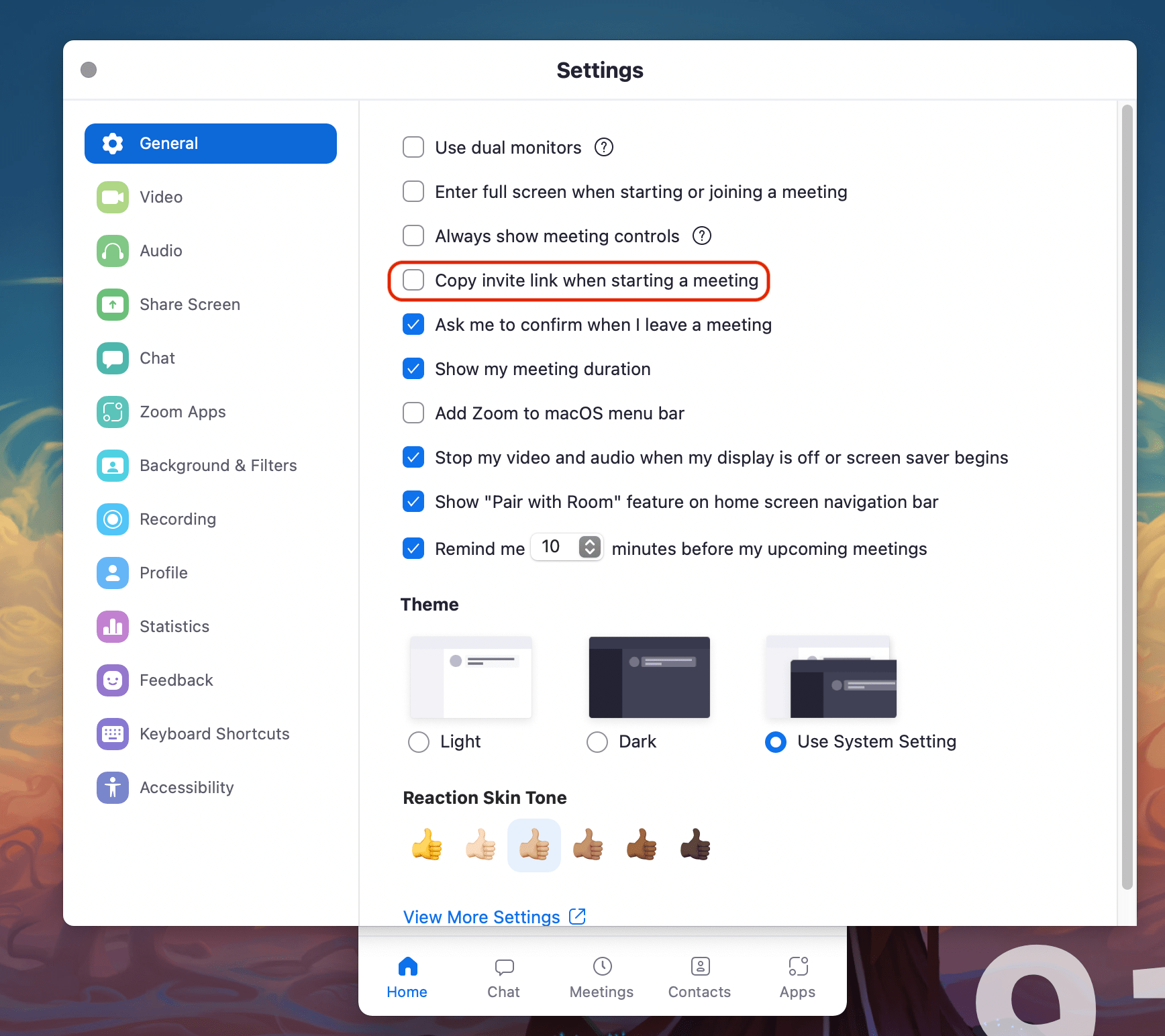
First thing to do is to enable a setting in zoom which copies the meeting url when you start a new meeting. In the general tab, make sure "Copy invite link when I starting a meeting" is checked. Now with that out of the way, let us write the hammerspoon part of the code.
OK, what the code has to do is:
- Save current window
- Open/Focus zoom
- Start meeting
- Wait for meeting to start (wait for clipboard to have meeting link)
- Focus original window
- Paste the link
These steps can be literally converted to code:
 1-- Save current window
 2local currentApp = hs.window.focusedWindow()
 3-- Open/Focus zoom
 4hs.application.launchOrFocus("zoom.us")
 5-- Start meeting
 6hs.eventtap.keyStroke({"cmd", "ctrl"}, "v")  -- shortcut to start meeting
 7-- Wait for meeting to start (wait for clipboard to have meeting link)
 8local clipChanged = waitTillClipChanges(7)  -- util func code below
 9-- Focus original window
10currentApp:focus()
11-- Paste the link
12hs.eventtap.keyStroke({"cmd"}, "v")
And there you go, that is all that you have to do. Just another crude hack that makes my life easier. You can find the full code below or in my dotfiles repo.
 1function waitTillClipChanges(maxTime)
 2    local initialClip = pasteboard.getContents()
 3    local i = maxTime
 4    while (i > 0) do
 5        os.execute("sleep " .. tonumber(1))
 6        if (pasteboard.getContents() ~= initialClip) then
 7            return true
 8        end
 9        i = i - 1
10    end
11    return false
12end
13
14hs.hotkey.bind(
15    {"ctrl", "alt", "shift"},
16    "z",
17    function()
18        local currentApp = hs.window.focusedWindow()
19        hs.application.launchOrFocus("zoom.us")
20        hs.eventtap.keyStroke({"cmd", "ctrl"}, "v")
21        local clipChanged = waitTillClipChanges(7)
22        if not clipChanged then
23            -- in case zoom was not open, redo the thing
24            hs.application.launchOrFocus("zoom.us")
25            hs.eventtap.keyStroke({"cmd", "ctrl"}, "v")
26            waitTillClipChanges(7)
27        end
28        currentApp:focus()
29        hs.eventtap.keyStroke({"cmd"}, "v")
30    end
31)
K. THX. BYE